Deepslice
Deepslice is a modern pizza delivery application designed to simplify online food ordering through a seamless and user-friendly mobile experience.
Role
UI/UX Designer
Platform
Mobile App
Industry
Food Delivery
Tools
Figma
Project Overview
Deepslice is a pizza delivery mobile application designed to provide users with a seamless ordering experience. The app allows customers to browse menu items, customize pizzas, place orders, and track deliveries in real time.
The project focused on improving usability, reducing friction during ordering, and creating a visually engaging experience that encourages repeat purchases.
The Problem
Ordering food should be quick and effortless, but many food delivery apps create unnecessary friction through complex navigation, overwhelming menus, and lengthy checkout processes.
- • Complex Navigation: Users struggled to quickly find their preferred items among large menus and categories.
- • Lengthy Checkout Process: Multiple steps during checkout increased drop-offs and delayed order completion.
- • Poor Order Visibility: Customers wanted clearer updates about order preparation and delivery status.
The Objective
The primary objective was to create a pizza ordering experience that feels simple, intuitive, and enjoyable.
The Process
Research
Analyzed popular food delivery apps and identified common usability issues and user expectations.
Planning
Defined user flows, content hierarchy, and feature priorities for a streamlined ordering experience.
Wireframing
Created low-fidelity wireframes to establish navigation patterns and screen structure.
UI Design
Designed a modern interface focused on clarity, visual appeal, and ease of use.
Prototyping
Built interactive prototypes to validate user journeys and interaction patterns.
Usability Testing
Tested key user flows and refined screens based on feedback and usability observations.
My Role
The Solution
The final design delivers a streamlined pizza ordering experience through intuitive navigation, personalized customization, and real-time order tracking. The platform was designed around speed, simplicity, and visual engagement to help users complete orders with minimal effort.
Home Experience
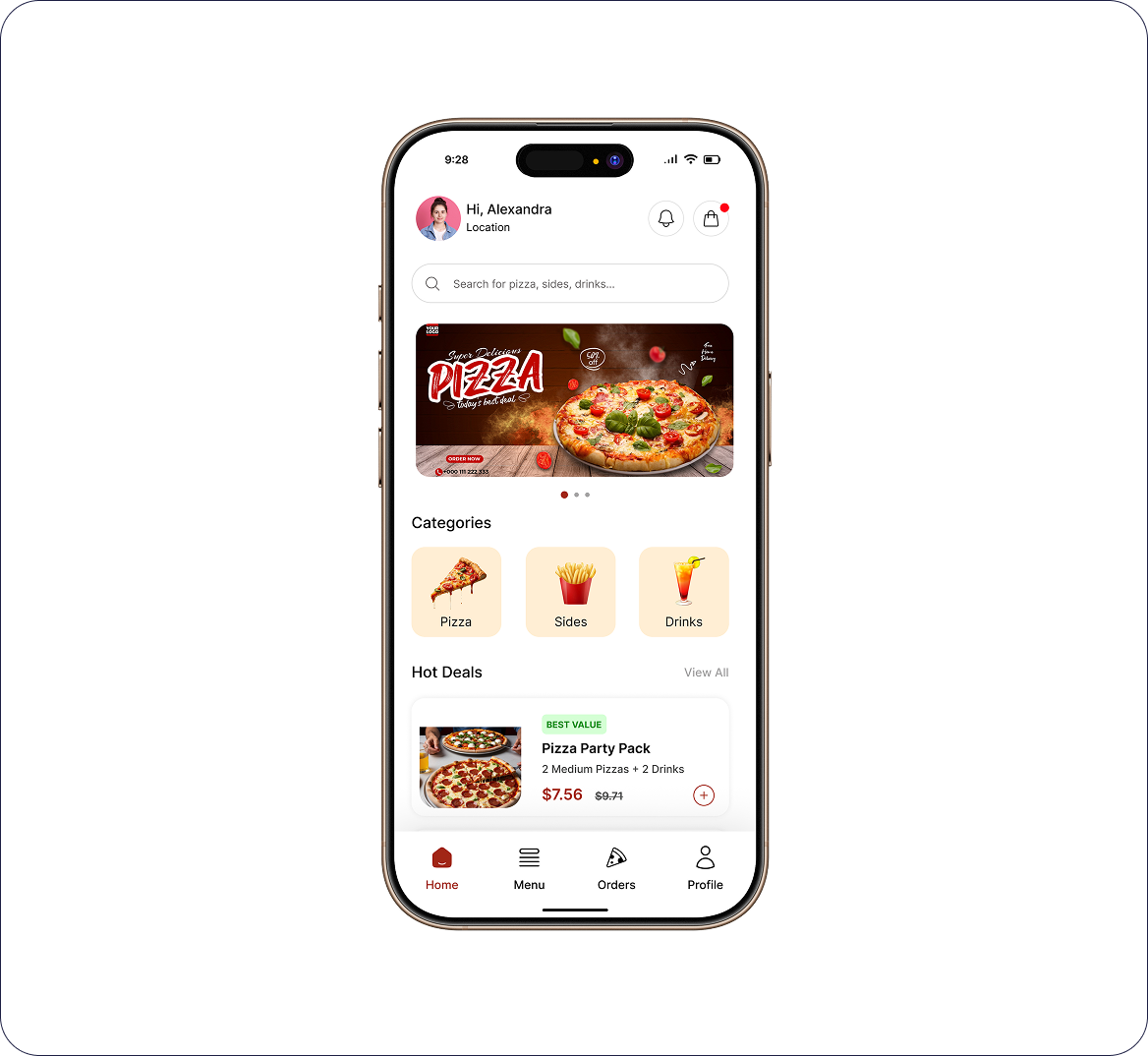
A personalized home screen showcasing featured pizzas, popular items, promotions, and quick access to categories.
Pizza Customization
Users can customize pizza size, crust type, toppings, and add-ons through a clear and interactive interface.
Seamless Checkout
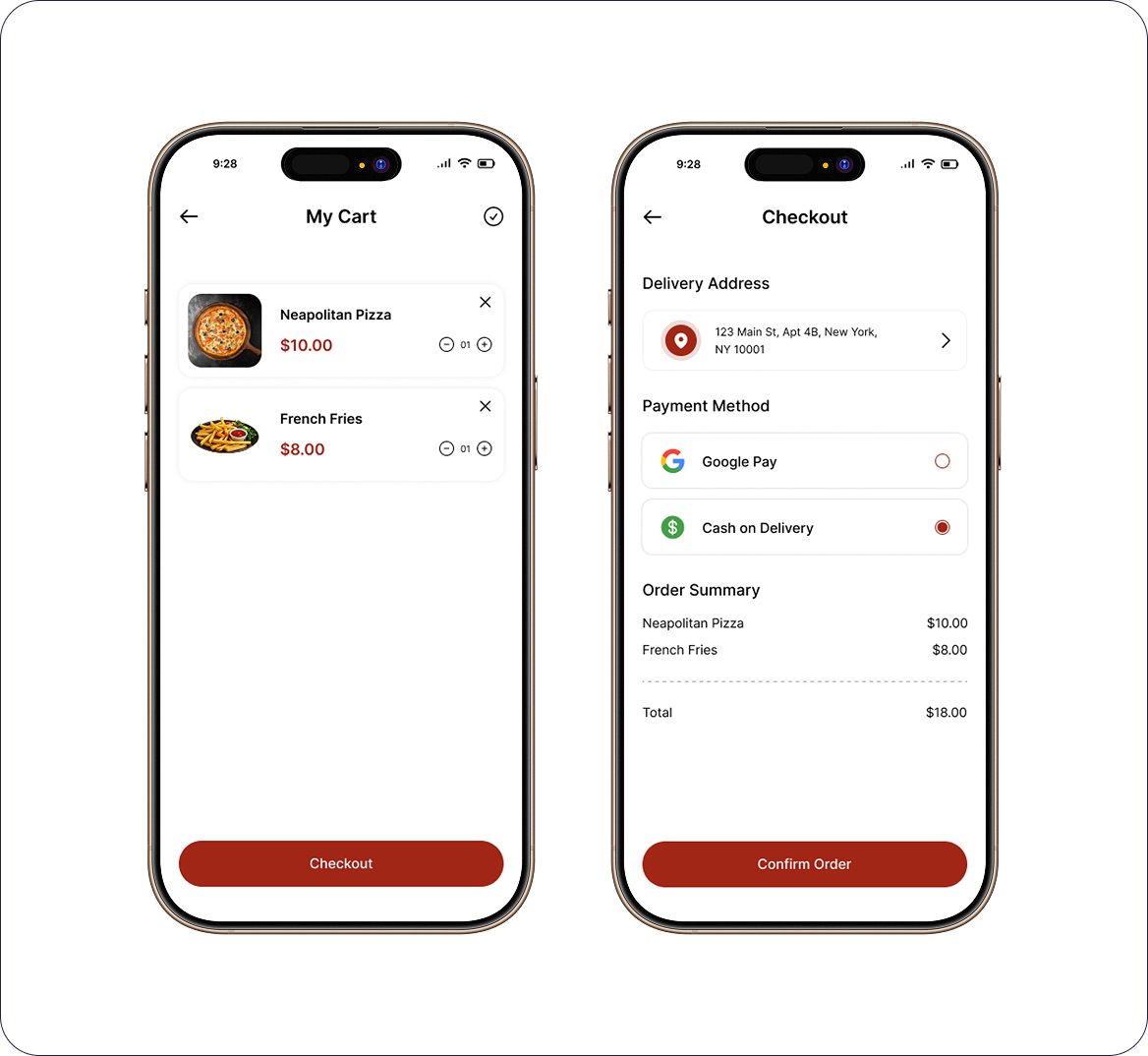
A simplified checkout flow with saved addresses, payment methods, and order summary review.
Order Tracking
Real-time order status updates help users track progress from preparation to delivery.
The Challenge
Simplifying Food Discovery
The menu contained multiple categories, promotions, and customization options. The challenge was creating a structure that helps users quickly find products without feeling overwhelmed.
Optimizing Checkout Flow
Reducing the number of steps required to place an order while maintaining clarity around delivery details and payment information.
Maintaining Visual Consistency
Creating a cohesive design system that remains consistent across product listings, customization screens, cart management, and order tracking experiences.
Design Approach
-
explore
User-Centered Navigation
Designed intuitive navigation patterns that help users reach products quickly.
-
auto_awesome_motion
Clear Visual Hierarchy
Used typography, spacing, and imagery to improve content scanning and readability.
-
grid_view
Consistent Design System
Created reusable components and standardized UI patterns throughout the app.
-
smartphone
Mobile-First Experience
Optimized layouts and interactions specifically for mobile users.
-
psychology
Reduced Cognitive Load
Minimized unnecessary choices and simplified decision-making during ordering.
Wireframes
Creating low-fidelity screens to focus on information architecture and user flows, prioritizing faster discovery and simplified checkout experiences.
UI Showcase
High-fidelity interface design focusing on clarity, visual hierarchy, and tactile feedback.
Home Experience
Intelligent category filtering combined with high-impact promotional banners ensures users find their favorites instantly. Search and popular items are placed within natural thumb-reach.
Product Details
A robust customization engine allows users to swap ingredients, adjust crust types, and select portions with live price updates and visual feedback.
Cart & Seamless Checkout
Minimized friction through saved payment methods and address presets. Real-time cart editing prevents back-and-forth navigation during final steps.
Order Tracking
Interactive live-status tracking from preparation to doorstep. Integrated delivery partner profiles and ETAs keep the user informed and engaged.